


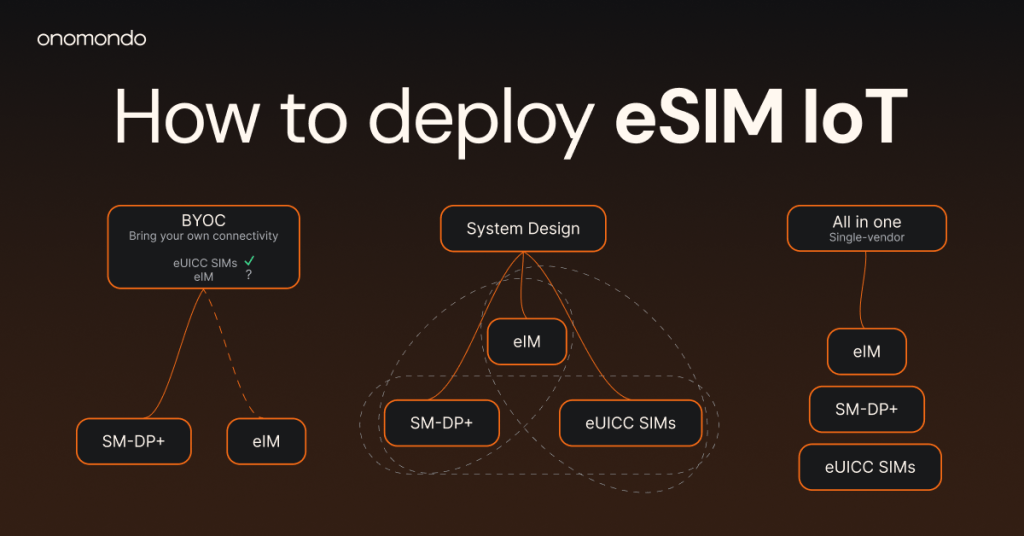
This one’s for you looking at the light at the end of the tunnel: a brand new fleet that you can provision remotely with eSIM IoT. You know you need eUICC SIMs, connectivity profiles, and an eSIM IoT manager – you’ve done your market research, you have your deals. Now what? How do you set up the fleet before it’s released into the wild? This article explains the three hows of eSIM IoT deployment:
- How to deploy the three eSIM IoT ecosystem components
- How to decide based on your priorities
- What you gain and what you trade off in each case
OWNERSHIP MODEL
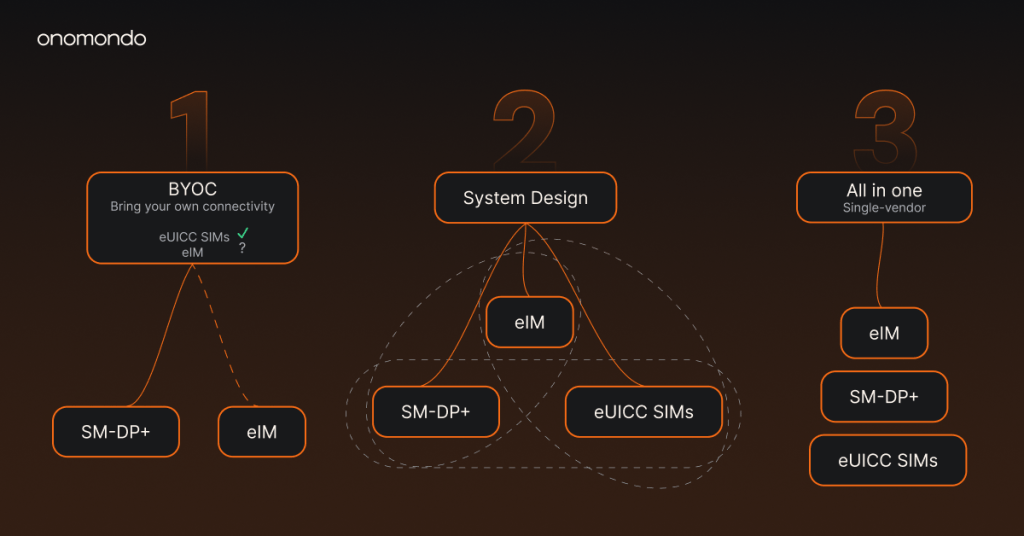
1. Bring your own connectivity – hardware first, connectivity later
eSIM IoT still requires some hardware decisions, namely the form factor. In this first path, this means that you have already decided and purchased the SIM cards or chips and the eSIM IoT Remote Manager that goes with them, your PCB is (being) designed accordingly, and you are on the lookout for profiles – or as named in the section above, the connectivity plan(s).
In technical terms, you have selected a vendor’s eUICC and eSIM IoT Remote Manager, and you have yet to choose the operator profiles downloaded to your devices. You control which operators you work with, negotiate your own connectivity agreements, and avoid being limited to the profiles the eSIM vendor bundles.
A note on the eSIM IoT Remote Manager
This option is popular in the current state of the eSIM IoT market: your SIMs come with an eSIM IoT Remote Manager and you fetch the profiles –the connectivity– to that bundle. If this eSIM IoT Remote Manager is configurable, you can also use that eSIM IoT Remote Manager to initiate your operations, get an eSIM IoT Remote Manager of your choice and use the initial eSIM IoT Remote Manager to change to the eSIM IoT Remote Manager of your choice. But if this eSIM IoT Remote Manager is not configurable, then the eSIM IoT Remote Manager has been decided for the lifetime of the fleet, together with the SIMs.
What you need
Profiles from your preferred connectivity providers. These profiles will be provisioned to the already installed SIMs via the eSIM IoT Remote Manager you got together with your SIMs.
- Benefits
Readily available in 2026, simplified logistics and manufacturing process, ideal workflow for fleet managers mostly interested in having connectivity options throughout the lifetime of the fleet.
- Challenges
Check whether the “bring your own connectivity” offer is deliverable across the board, i.e., bring any connectivity besides the SIM vendor’s catalog. Some vendors allow external profiles in principle but still restrict which profiles, or credentials you can use.
Vendors
Initially two: the SIMs + eSIM IoT Remote Manager provider and the connectivity provider(s). If you can and want to change eSIM IoT Remote Managers later, you can either add another provider for that (turning it into the next option: 2 System design) or get an eSIM IoT Remote Manager from your connectivity provider.
2. System design – Independent selection of each component
You independently select the SIMs, the eSIM IoT Remote Manager, and connectivity provider(s), then integrate and test the components yourself. This gives the highest level of control and the strongest position to prove interoperability across vendors.
What you need
Select all 3 components: the eUICC SIM, the control layer (eSIM IoT Remote Manager) and the profiles/connectivity plans. You will also need some engineering resources to test and unify the system.
- Benefits
Maximum level of control and future-proofing. Every decision is yours.
- Challenges
The integration burden is yours and requires engineering power. The payoff is leverage, no single vendor controls the whole stack or your ability to change providers at any part of the ecosystem.
Vendors
One to three. Unless you buy two components from the same vendor, you have a provider for each of the three components – SIMs, eSIM IoT Remote Manager, connectivity profiles.
3. All in one
This is the option for the fleet manager who previously said “I don’t want to buy a project”. You get all three components – eUICC SIMs, eSIM IoT Remote Manager, connectivity profiles – from one vendor. This is usually the fastest to deploy and the simplest to operate, because the components are already integrated.
What you need
A heck of a good vendor!
- Benefits
Quickest time to deploy, fewest things to maintain.
- Challenges
When you’re buying everything from one supplier, make sure that the entire ecosystem is open and that every component is not just interoperable in theory, but interchangeable in practice.
Vendors
One for all components.
HOW TO PROVISION THE FIRST PROFILE
Whichever ownership model you choose, a new device still needs an initial way to connect. You can also move an existing fleet or parts of it over the air, as long as the deployed SIMs talk to an eSIM IoT Remote Manager and can receive a new profile.
1. Factory-loaded operational profile
Devices leave the factory with a profile already installed in the SIM and connect to this profile from first power-on. You can use the connectivity of that profile to initiate any subsequent change.
- Benefits
Simple activation, no initial download.
- Trade-off
Adds a task during manufacturing.
2. Bootstrap profile
The device leaves the factory with a temporary profile. This profile has only one job: get the device online so it can download its intended operational profile. It is worth asking whether you need a bootstrap at all. A good reason for choosing bootstrap is that the device’s final profile is not yet decided. So a bootstrap profile is a niche but appropriate choice for fleet managers whose deployment is extremely time-limited but they still want to put some time and effort into choosing the final profile(s).
- Benefits
The final connectivity provider can be chosen later, after manufacturing or deployment.
- Trade-off
The bootstrap network must have coverage where the device first powers on, and the download must complete before the device can operate normally.
Navigate the SGP.32 market with confidence
Over 90 pages with a single goal: to level the playing field with eSIM IoT vendors. Our complete eSIM IoT buyer’s guide is your SGP.32 map from exploration to procurement.
eSIMs provisioned. What next?
The two ways above cover how to provision the initial profile onto the device – the next step is to tell the device how to operate connectivity. After you have downloaded the profile of your choice using the initial profile at provisioning, then you will also need to configure a fallback and a priority (operational) profile.
There are many options here: keep the initial profile as priority profile and download another profile to set as fallback; Configure the initial profile as fallback and the downloaded profile as priority etc. Regardless, after provisioning is set and done, keep in mind to configure the profiles so that your devices know which profile to operate on.