
What’s new
Managing large SIM fleets just got a whole lot easier. With Customized SIM View, you gain full control over your SIM table layout and adapt it to how you actually work.
You’ll now be able to:
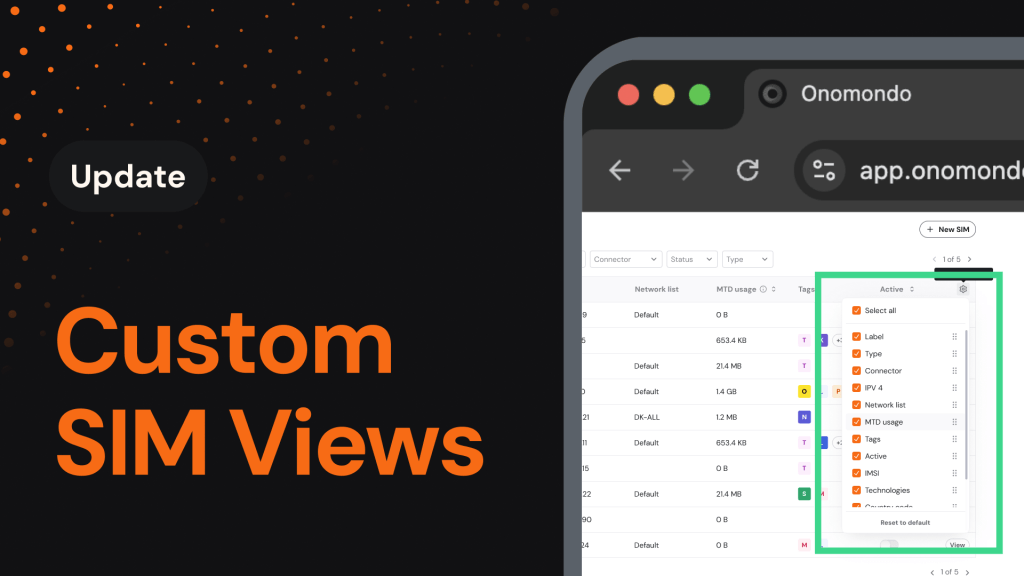
- Choose your columns: Select exactly which data points appear in your SIM table.
- Access deeper network details: New data columns, including IMSI, Current Network, Current country, Technologies, MCC, MNC, Last Online, Cost alert, Data limit, and ICCID. This allows you to analyze connectivity and network information without opening individual SIM pages.
- Organize your way: Drag and drop data columns to create a structure that supports your workflow and priorities.
Why it matters
When managing hundreds or thousands of SIMs, retrieving specific details often requires opening individual SIM pages and repeating the process across multiple devices. This slows down analysis and makes it difficult to maintain a clear overview of your entire fleet.
Customizable SIM views reduce that friction by allowing you to surface the information you need in a single, structured table. With fewer context switches and improved visibility, your team can work more efficiently across all devices.
How it works
How to get started
Getting your perfect view set up takes just seconds:
- Open the Onomondo platform and navigate to the SIMs page.
- Click the settings icon in the top right corner of the table and select which fields you want to display, including all the newly added network columns.
- Drag and drop to reorder columns in whatever sequence makes sense for you